
Let’s name the elephant in the room: almost every “wired vs wireless CCTV” article online is a generic pros/cons list written for the UK or US. That’s not your reality.
Australian homes change the calculation because we deal with:
-
NBN variability (especially Fixed Wireless busy hours),
-
brutal summer heat that batteries hate,
-
extreme UV that destroys the wrong cable jacket,
-
and coastal salt that quietly eats connectors.
This post is the honest version.
Key Takeaway:
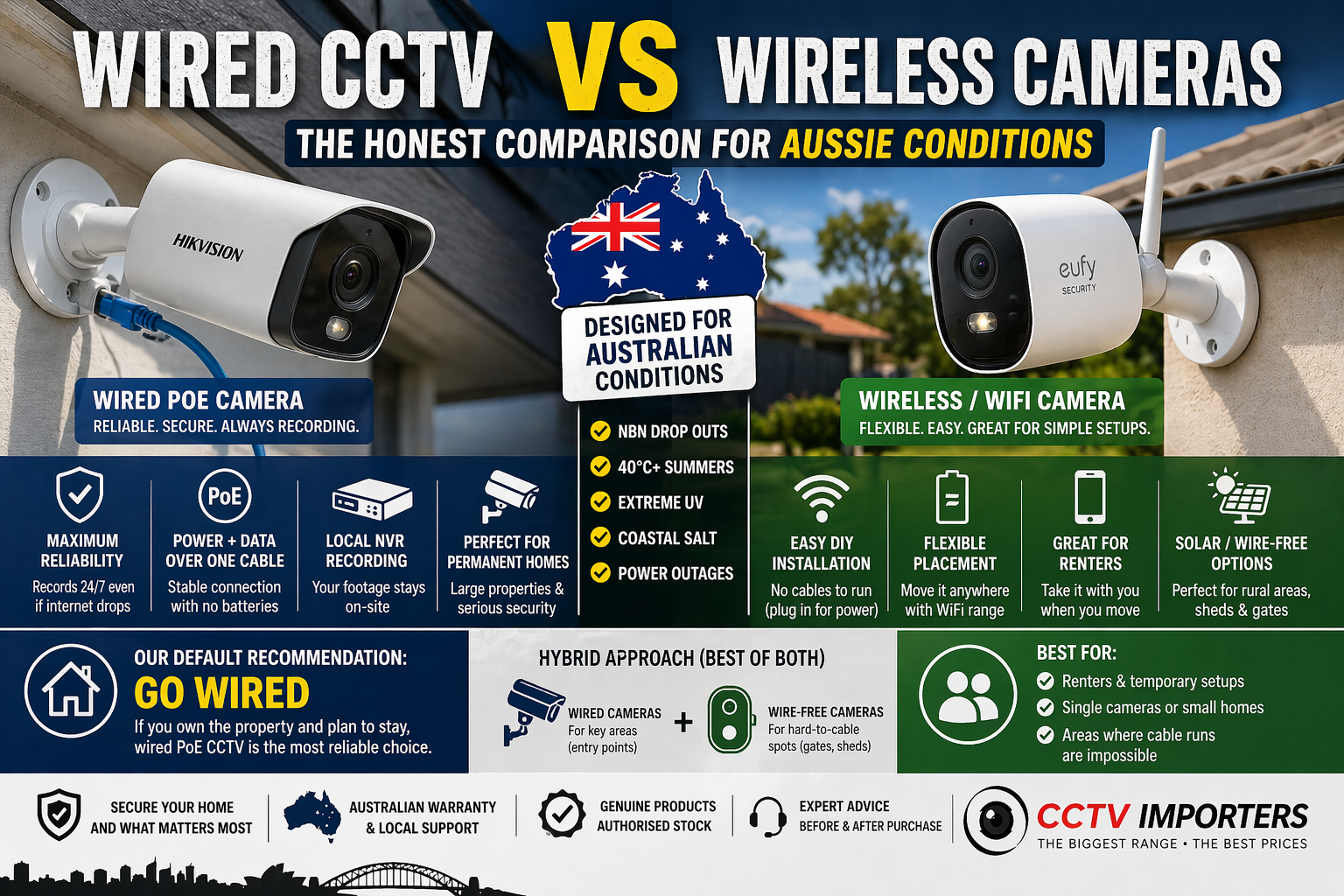
Wired PoE CCTV: best for permanent homes, large properties, maximum reliability, proper 24/7 recording
Wireless / WiFi cameras: best for renters, temporary setups, single cameras, places where cable runs are genuinely impossible
Solar wire-free cameras: best for rural gates, sheds, farms, and outbuildings with no power
Our default recommendation: if you own the property and plan to stay, go wired. The reliability gap is real in Australia, and it matters when something actually happens.
First, let’s clear up the terminology (because “wireless” means 3 different things)
Most buyers bounce off this topic because the language is sloppy. So here’s the clean version.
Wired PoE cameras (the professional standard)
PoE = Power over Ethernet. One Cat6 cable carries power + data from the camera to your recorder/network.
-
You run a cable from each camera back to an NVR (or to a PoE switch, then uplink back).
-
Typical max run is 100 metres per cable segment without extenders (that’s the standard Ethernet distance most installers design around).
-
Your cameras can record 24/7 to a local NVR, even if the internet goes down.
WiFi cameras (wireless data, but still powered)
This is the most common misconception: WiFi cameras are often not “wire-free.”
-
Video goes over WiFi
-
But the camera usually still needs power from a nearby socket (or a hardwired power supply)
-
Performance depends on WiFi range and your home network conditions
Wire-free cameras (truly wireless: battery or solar)
These are the “no cables at all” cameras.
-
Battery powered (sometimes with a solar panel)
-
Usually motion-triggered recording only to save battery
-
Most flexible to place, but biggest trade-offs in recording continuity
That terminology section alone is missing from most competitor posts, and it’s why so many people make the wrong purchase first.
What Australian conditions change about wired vs wireless
This is the section most posts don’t write. It’s also the section that decides what you should buy.
NBN reliability + WiFi dropout problem
Wireless cameras depend on two things:
-
your WiFi (range + interference + router quality), and
-
your internet connection for remote viewing (and sometimes for cloud recording).
If you’re on NBN Fixed Wireless, busy-hour performance can drop, especially on upload. The ACCC’s broadband performance reporting shows Fixed Wireless users’ upload performance averaging around 70.6% of plan speeds during all hours and 65.8% during busy hours in a recent report.
nbn also notes Fixed Wireless speeds can be impacted by network congestion during busy periods.
Why this matters for cameras:
-
Cloud-connected wireless cameras can lose remote viewing when internet drops.
-
If they’re cloud-only, recording may stop entirely during outages.
-
A wired PoE system recording to a local NVR keeps capturing footage even if the internet is down (remote access is down, but recording continues).
Real example: summer storms roll through, NBN drops, and the one week you actually need footage… the cloud camera went dark. A local NVR keeps recording.
Summer heat and battery pain (the 40°C reality)
Australian summers regularly push into the range where lithium batteries degrade faster and behave differently.
Academic battery literature commonly notes accelerated lithium-ion degradation at higher temperatures, with >35°C frequently referenced as a threshold where degradation mechanisms speed up.
What that means in plain English:
-
battery cameras drain faster in heat
-
“rated battery life” becomes optimistic
-
you end up climbing ladders far more often than you expected
Wired PoE doesn’t have this problem: it’s continuous power, every day, all year.
One extra Aussie detail: cheap networking gear can also struggle in hot roof spaces. Don’t buy bargain PoE switches for installs that live in 45°C roof cavities.
UV radiation and cable degradation
Australia has some of the highest UV levels in the world.
That matters because indoor Cat6 cable jackets aren’t designed to live in direct sun.
Outdoor Ethernet cable needs a UV-resistant jacket. Exterior-rated cable is specifically designed to withstand sunlight and weather exposure.
Practical takeaway:
-
if any cable run is exposed to sun, use outdoor UV-rated cable or put it in proper conduit
-
don’t run indoor patch cable along eaves and expect it to look good in 12 months
Wireless cameras aren’t immune either: housings and brackets also degrade in UV, so IP ratings and materials still matter.
Coastal salt corrosion (if you live near the beach)
Salt spray accelerates corrosion on metal connectors and fasteners.
Coastal install basics:
-
aim for outdoor cameras with at least IP67 (dust-tight, temporary immersion protection).
-
seal exposed RJ45 joins properly; the camera body might be IP-rated, but the connector is often the weak point
-
use weather boots / junction boxes / self-amalgamating tape and a drip loop (practical installer best practice)
This isn’t “wired vs wireless” so much as “buy and install like you live in Australia.”
Cabler licensing rules (unique to Australia, and people ignore it)
Australia regulates customer cabling work. ACMA explains the industry is regulated under cabling provider rules and points to the Wiring Rules.
AS/CA S009 applies to the installation and maintenance of fixed or concealed cabling connected (or intended to be connected) to a telecommunications network.
Practical interpretation for homeowners:
-
mounting cameras and mounting an NVR is usually fine
-
but if you’re running concealed cables through wall cavities/ceiling spaces as part of your home’s structured cabling, you should use (or be supervised by) a registered cabler in line with the rules/standards
This adds cost to wired installs, but it’s a one-time cost, and the result is compliant, neat, and reliable.
Head-to-head: 6 factors that actually matter
1) Reliability and recording continuity
Wired PoE: best-in-class reliability.
-
true 24/7 recording to local NVR
-
not dependent on WiFi stability
-
recording continues even if internet drops
WiFi cameras: reliability depends on WiFi range/interference and router quality. Dropouts happen, especially with distance, brick walls, metal garage doors, mesh nodes placed badly, etc.
Wire-free battery/solar: motion-triggered clips only (usually), and you can miss the “lead-up” to an event.
Winner: Wired.
2) Video quality and resolution (especially 4K multi-camera)
Wired PoE systems can handle high bitrates across many cameras because the traffic is on dedicated cables/switching.
WiFi cameras can look great… until:
-
you add more cameras,
-
you add more WiFi devices (TVs, tablets, smart appliances),
-
or you try to push 4K streams through a congested network.
If you’re planning 4+ cameras and you care about evidence quality (faces, plates, details), wired wins.
Winner: Wired.
3) Installation difficulty and cost (upfront vs total cost)
Wired PoE: higher upfront cost (cable, routing, possibly a registered cabler for concealed work).
But it’s usually “set and forget” once installed.
WiFi: easy DIY for 1–2 cameras. Lower upfront.
Wire-free: easiest install, but you “pay” in battery maintenance.
The hidden cost most people ignore:
-
multiple ladder climbs each year per camera (battery models)
-
dealing with dead cameras when you forget to charge them
-
replacing batteries over time
Winner: Wireless for upfront cost; wired for long-term “I don’t want to think about it.”
4) Cybersecurity and footage privacy
Wireless cameras are IoT devices. The Australian Cyber Security Centre explicitly includes security cameras as IoT examples and provides guidance on buying/using IoT securely.
Good news: risk is manageable if you do the basics:
-
change default passwords
-
enable MFA/2FA where available
-
keep firmware/apps updated
-
lock down remote access
Also relevant in 2026: Australia introduced mandatory cybersecurity standards for many consumer smart devices under new rules commencing March 2026.
Wired with local NVR: footage can stay on-site by default. Remote access is optional, and you control it.
Winner: Wired (privacy + smaller attack surface), assuming both are configured sensibly.
5) Flexibility and scalability
Renters: wireless wins. You can take it with you.
Owner-occupied: wired scales cleanly if planned properly.
A smart wired design for Aussie homes often uses:
-
a central NVR location
-
plus a PoE switch closer to a group of cameras when cable routing is hard or long
And yes, you can bridge buildings too: for detached garages/workshops, a wireless bridge can be the clean answer when trenching is a pain. (A bridge is still usually paired with a wired PoE camera setup on each side.)
Winner: Wireless for renters/temporary; wired for permanent scalable installs.
6) Power outage behaviour (storms, summer blackouts)
This is the one category where wire-free cameras have a real advantage.
-
Wired PoE + NVR: stops during a power outage unless you add backup.
-
Wire-free battery: can keep recording during an outage (motion-triggered).
Best practice for serious home security:
-
wired system for main coverage
-
add a UPS for the modem/router/NVR so you keep recording through short outages (and sometimes keep remote access, depending on the internet)
UPS is a standard accessory category for exactly this reason.
Winner: Wire-free during outages only; wired + UPS is the gold standard overall.
Summary table (quick scan)
|
Factor |
Winner |
|
Recording reliability |
Wired |
|
Video quality (multi-camera) |
Wired |
|
Upfront cost |
Wireless |
|
Total cost of ownership (4+ cams, long-term) |
Wired (most cases) |
|
Cybersecurity/footage privacy |
Wired |
|
Flexibility (renters/temporary) |
Wireless |
|
Outage recording |
Wire-free (unless wired has UPS) |
Which system should YOU choose? (by property type in Australia)
Owner-occupied suburban home (3–4 bed)
Recommendation: Wired PoE + NVR
You own it, you’ll be there for years, reliability matters. Get 4–8 cameras and record locally.
Renter / apartment
Recommendation: Wireless WiFi
You can’t drill and you can’t run concealed cables. Start with front door + key entry points.
Rural / farm / large acreage
Recommendation: Wired for main buildings + solar/wire-free for gates/sheds
Beyond 100m runs, solar/wire-free starts to make sense, especially for gates and long driveways.
CCTV Importers already has off-grid content for exactly these use cases.
Investment / rental property
Recommendation: Wired PoE
Set and forget. No tenant battery maintenance. Local recording.
Holiday home / coastal property
Recommendation: Wired + UPS backup
Coastal corrosion protection + recording through outages is the whole game.
Small business (shop / café / office)
Recommendation: Wired PoE
Evidence quality and continuous recording matter, and WiFi congestion during business hours is a real problem.
The hybrid approach (what we recommend most often)
Many Aussie properties don’t need “wired OR wireless.” They need wired where it matters and wire-free where cabling is painful.
A strong hybrid layout:
-
front door, driveway, rear entry = wired PoE (reliability + 24/7)
-
detached garage, gate, shed = solar/wire-free as fill-in coverage
Key rule:
Never rely on wire-free cameras as your primary surveillance. Use them to cover hard-to-cable spots.
FAQ: wired vs wireless CCTV in Australia
Can wireless CCTV work without internet in Australia?
Often yes for local recording, but it depends on the system:
-
WiFi cameras can still work on your local network
-
remote viewing generally needs internet
-
cloud-only cameras need internet to record
How long do wireless camera batteries last in Australian summer?
Heat accelerates lithium battery degradation and can reduce performance, especially in sustained high temperatures (>35°C).
In practice, expect “rated battery life” to be optimistic in QLD/WA/NT summers, especially in high-traffic areas (more motion triggers).
Do I need a licensed cabler to install wired CCTV in Australia?
If you’re doing concealed/fixed cabling work that falls under the Wiring Rules (AS/CA S009) and cabling provider rules, you should use a registered cabler (or supervised installation) in line with ACMA guidance.
What cable should I use outdoors in Australia?
Use UV-rated outdoor Ethernet cable (or run cable in appropriate conduit). Outdoor jackets are designed for sunlight/weather; indoor jackets are not.
Is wireless CCTV safe from hacking?
Wireless cameras are IoT devices. Follow ACSC guidance: change defaults, update, secure accounts, and set up devices safely.
Can I mix wired and wireless cameras on one system?
Sometimes. Many households run a wired NVR system for core cameras and add wireless/solar cameras for fill-in coverage. Just don’t expect “one perfect app” across everything unless you choose an ecosystem designed for it.
Conclusion: the honest recommendation
If you own your home and you’re serious about security, wire it up. It’s more work upfront, but it’s the only system type that can keep recording reliably when WiFi is flaky and the internet drops.
If you’re renting, installing one camera, or filling gaps, wireless is totally reasonable. Just go in with eyes open: battery maintenance and WiFi performance are the trade.


