
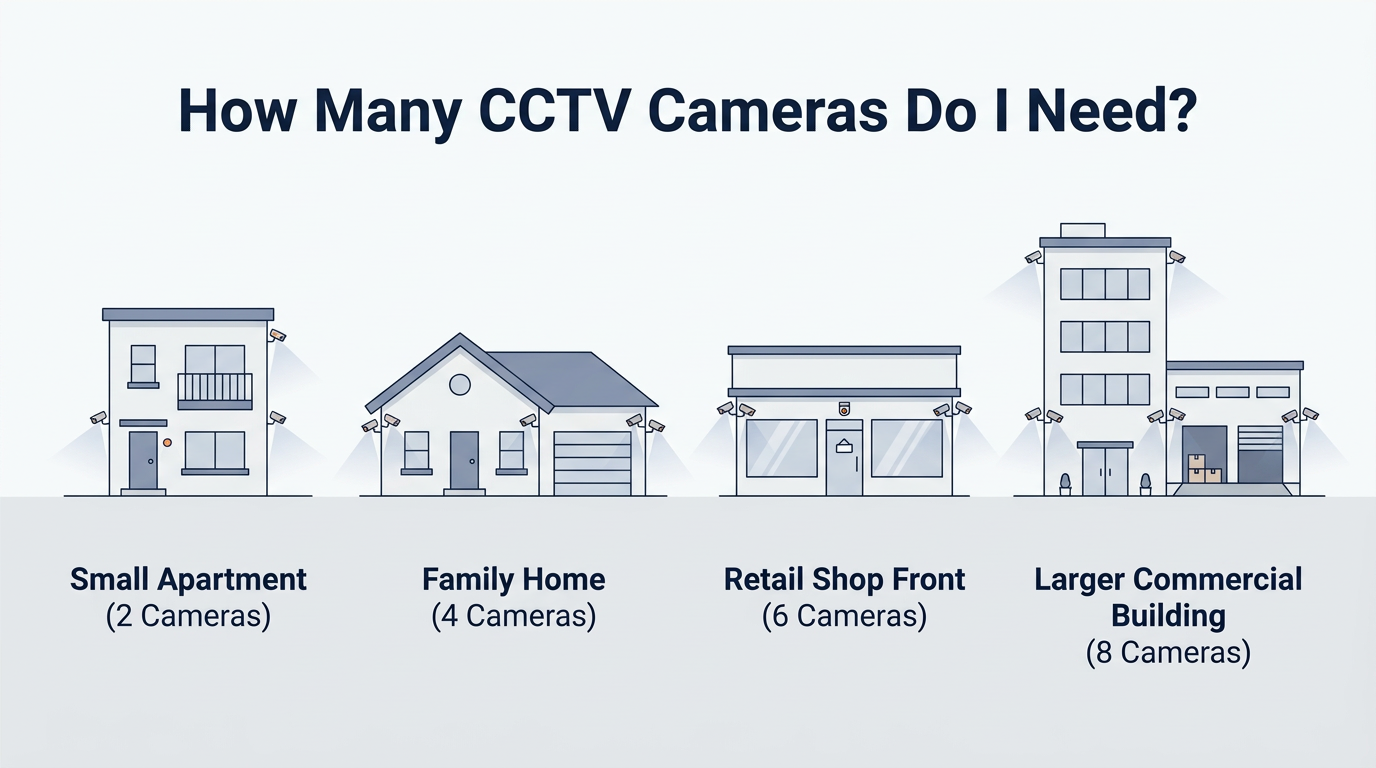
If you’re shopping for CCTV, the camera count question is the one that decides everything: your coverage, your NVR, your storage, and your budget.
And it’s a fair question because “more cameras” isn’t always “better security”. The goal is coverage of risk zones, not random angles of your walls.
A quick Australia reality check: in 2023–24, an estimated 2.1% of Australian households (217,600) experienced a break-in, and 2.1% (226,300) experienced an attempted break-in. In the most recent break-in incident, 71% had something stolen and 39% had property damaged.
So let’s build a camera count that actually makes sense for your home or business.
The fast answer (rule of thumb)
-
2 cameras: Basic coverage for a small home/unit, or to cover front entry + driveway.
-
4 cameras: Most popular for typical homes. Covers front, back, driveway/garage, side path.
-
6 cameras: Better perimeter coverage for wider blocks, corner blocks, or small businesses.
-
8 cameras: Full perimeter plus extra detail cameras (front identification, side paths, backyard, garage, and a dedicated asset area).
If you want an easy way to decide, use the “zones” method below.
Step 1: Plan by zones (this is the SOP that prevents wasted cameras)
Zone A: Entry and face capture (priority #1)
This is where you want the clearest identification (front door, porch, gate).
Zone B: Vehicle and driveway (priority #2)
Driveway and street-facing angle for number plates, deliveries, and vehicle movement.
Zone C: Side access and blind spots (priority #3)
Side paths, narrow gaps, and anywhere a person can move unseen.
Zone D: Backyard / rear entry (priority #4)
Back doors, patio sliders, rear gate.
Zone E: Assets (optional but powerful)
Garage roller door, shed, tool area, storeroom, cash counter (business).
Now match these zones to 2, 4, 6, or 8 cameras.
2-camera example (simple coverage that still makes sense)
Best for
-
Apartments, units, small townhouses
-
People who mainly want deterrence + evidence for the most likely approach paths
Placement plan
-
Front entry (visible): covers the door, porch, and approach path
-
Driveway or rear entry: choose the area you care about most (carport/garage OR back door)
What to buy (typical setup)
-
Start with a 4-channel NVR so you can expand later (you’ll outgrow 2 cameras faster than you think).
-
If you want a ready bundle, browse 2 Camera Kits.
4-camera example (the “most homes” layout)
Best for
-
Standard single-storey homes, most double-storey townhouses
-
Anyone who wants “I can see all entries” coverage
Placement plan (covers the key zones)
-
Front door / porch (face capture angle)
-
Driveway / garage
-
Back door / patio
-
Side path (the sneaky one)
What to buy (typical setup)
-
4-channel NVR (or 8-channel if you already know you’ll add cameras).
-
Ready bundles: 4 Camera Kits or brand-specific Hikvision 4 Camera Kits.
6-camera example (strong perimeter coverage)
Best for
-
Corner blocks, wider frontage, homes with side gates
-
Small businesses (reception + entry + stock + carpark angle)
Placement plan (adds real perimeter strength)
-
Front door / gate
-
Driveway
-
Back door
-
Left side path
-
Right side path (or backyard fence line)
-
Garage / shed / asset zone
What to buy (typical setup)
-
8-channel NVR (because 6 cameras usually becomes 7 or 8).
-
Ready bundles: 6 Camera Kits.
8-camera example (full perimeter + detail cameras)
Best for
-
Larger double-storey homes, properties with multiple access points
-
Warehouses, retail, workshops, small commercial sites
-
Anyone who wants both: wide coverage + close-up identification angles
Placement plan (a practical “full coverage” layout)
-
Front door close-up (identification)
-
Front wide angle (approach + street view)
-
Driveway / vehicle angle
-
Garage roller door
-
Back door / patio
-
Backyard / rear fence line
-
Left side path
-
Right side path / side gate
What to buy (typical setup)
-
8-channel NVR or larger depending on future expansion
-
Ready bundles: Hikvision 8 Camera Kits or Dahua 8 Channel Kits.
Step 2: Don’t forget the “support gear” that makes CCTV work (and sell)
NVRs (your system’s brain)
If you’re using IP cameras, you’ll want the right NVR to record, replay, and manage footage.
Storage (retention depends on settings)
Storage is where most people under-buy. Your recording time depends on resolution, frame rate, compression, and whether you record 24/7 or motion-only. A simple starting point is to choose a surveillance-rated drive and scale up if you want longer retention.
PoE switch (when cable runs are long or wiring back to the NVR is hard)
A PoE switch isn’t only for “when you run out of ports”.
It’s most useful when:
-
your camera cable runs are long, and you want a more practical network layout, or
-
you can’t run many individual cables back to the NVR location (because of roof access, double-storey routing, limited conduits, or tricky pathways)
How it works (simple view):
-
You run camera cables to a PoE switch placed closer to that camera group (e.g., garage, comms cabinet, roof space access point).
-
Then you run one uplink cable back to your network/NVR location.
-
Your NVR records the cameras over the network once they’re configured.
We’ll explain the full “PoE switch + NVR” setup (including best placement and configuration tips) in a separate blog.
Internal link: PoE Switches: https://cctvimporters.com.au/collections/poe-switches
Common mistakes (that waste cameras and money)
-
Putting cameras too high so you get heads, not faces
-
Skipping the side path (it’s a favourite access route)
-
Buying exactly the number you need today (no room to expand)
-
Ignor
-
ing storage and realising too late you only have a few days of footage
If you’re unsure, it’s faster to get a placement plan based on your layout.
FAQs
Is 2 cameras enough for a house?
Sometimes, for a small unit or if you only care about front entry + driveway. Most standalone homes do better with 4.
Should I buy a 4-channel or 8-channel NVR?
If you’re considering 4+ cameras, an 8-channel often makes sense because adding “just one more” camera is common.
Do I need a PoE switch?
You may need a PoE switch if your cable runs are longer, or if it’s difficult to run multiple separate cables all the way back to the NVR due to accessibility (double-storey homes, tight roof space, limited conduits, or long distances).
In that case, you can run camera cables to a PoE switch and then use one uplink cable back to your network/NVR location, and the NVR records the cameras over the network once configured.
How much storage do I need?
It depends on recording settings. Choose a surveillance-rated drive and decide how many days of retention you want, then size up from there.


